See what moved. Know why. Know what to do next.
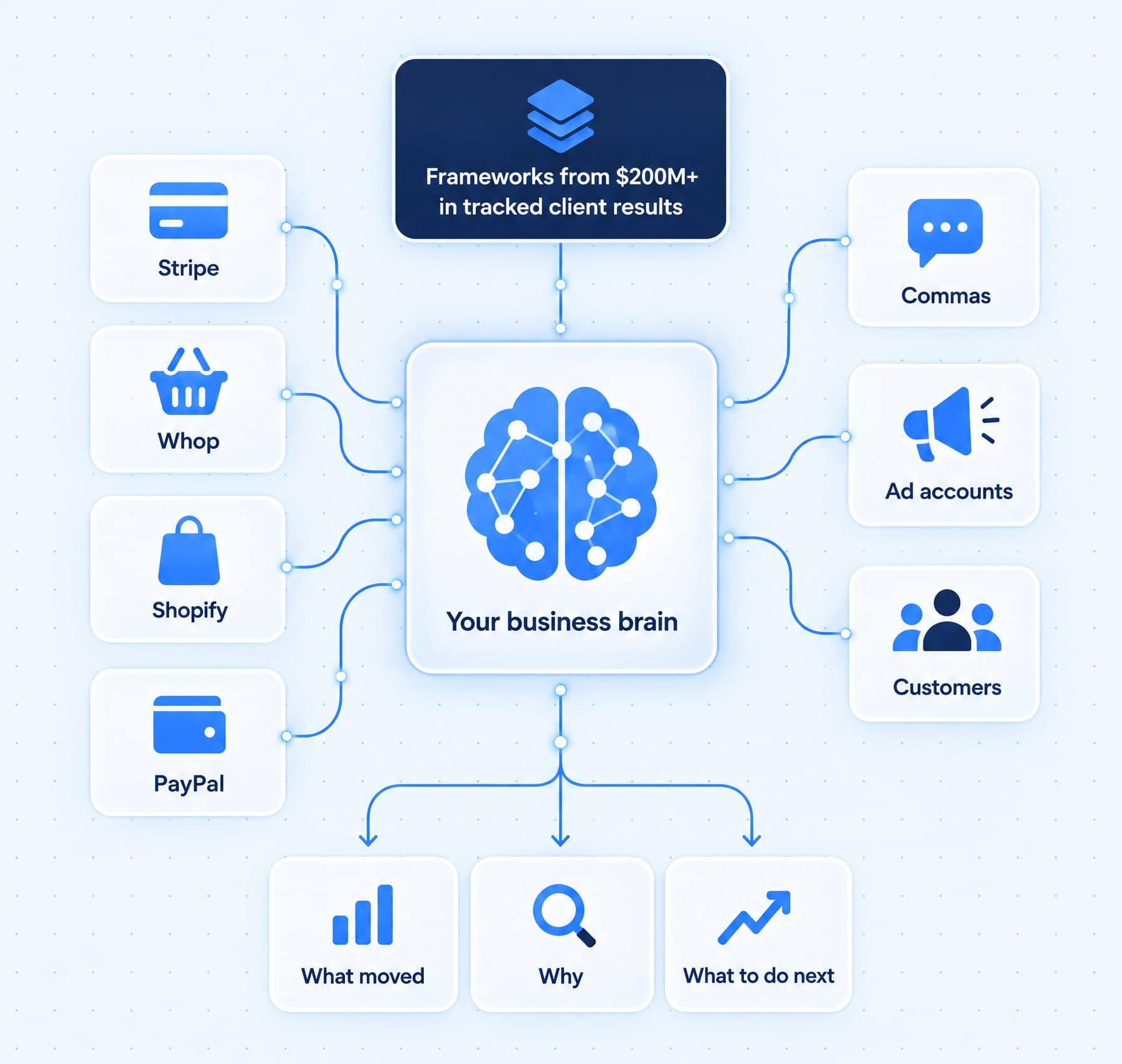
Every sale from Stripe, Whop, Shopify, PayPal and Commas lands in one history, with gross, refunds and net side by side. Your agent points out what moved, digs into why, and brings frameworks from more than $200 million in verifiable results for online businesses to what you do next.
The answers you need are already sitting inside your business. They're spread across five tools you never have time to open.
- Your sales sit in three dashboards that never agree.
- Refunds get noticed at the end of the month.
- Competitor moves show up months late.
- Nobody can say for sure which product is growing.
The intelligence work, handled on a schedule.
Concrete jobs, each labeled with the product that does it.
Every day
- Sync sales from Stripe, Whop, Shopify, PayPal and Commas into one history, each refund on the day it happenedOperator Mode
- Point out what moved: refunds climbing, a product picking up, or one that stopped sellingOperator Mode
- Track every ad's cost per lead, cost per purchase, return on ad spend and hook rateOperator Mode
- Watch the competitor pages and offers you name, on the schedule you setAgent Mode
Every week
- Lay out gross, refunds and net for each product, next to the period beforeOperator Mode
- Show which traffic sources your checkout sales came fromOperator Mode
- Track monthly recurring revenue, new and canceled subscribers, upgrades and churnOperator Mode
- Map where people drop off at each step of your funnelOperator Mode
- Summarize the week's numbers from your QuickBooks reports or Google SheetsAgent Mode
When it happens
- A number moves: the finding shows the numbers behind it, with a button to hand it to your agentOperator Mode
- Before a big decision: a brief with the options, the risks, a small pilot and a way backOperator Mode
- You want to know where you stand: a comparison with your real alternatives, each point tied to a dated sourceOperator Mode
- Someone needs the numbers: a PDF report or a spreadsheet they can openAgent Mode
05 / Intelligence
What AI does here
Most operators run on instinct, not because they want to, but because compiling the truth takes a day nobody has.
AI deployed as your intelligence function reads everything and briefs you: the week's numbers in one summary, competitor moves as they happen, customer feedback digested into themes, and the anomalies flagged early. The trend you'd have caught in month one, instead of quarter three.
And your agent does not start from zero. It works from frameworks built over a decade of marketing and sales, across 1,000+ campaigns and more than $200 million in verifiable results for online businesses, applied to your own numbers.
Sales of one product drop. Here is how you find out why.
One real situation, step by step: a product that was selling well starts to slow down, and you find the cause and the fix in one sitting.
- 1
All week
Every sale lands in one place
Stripe, Whop, Shopify, PayPal and Commas sync on their own. Each sale is counted once, and each refund on the day it happened.
- 2
When you open Analytics
The drop is right there
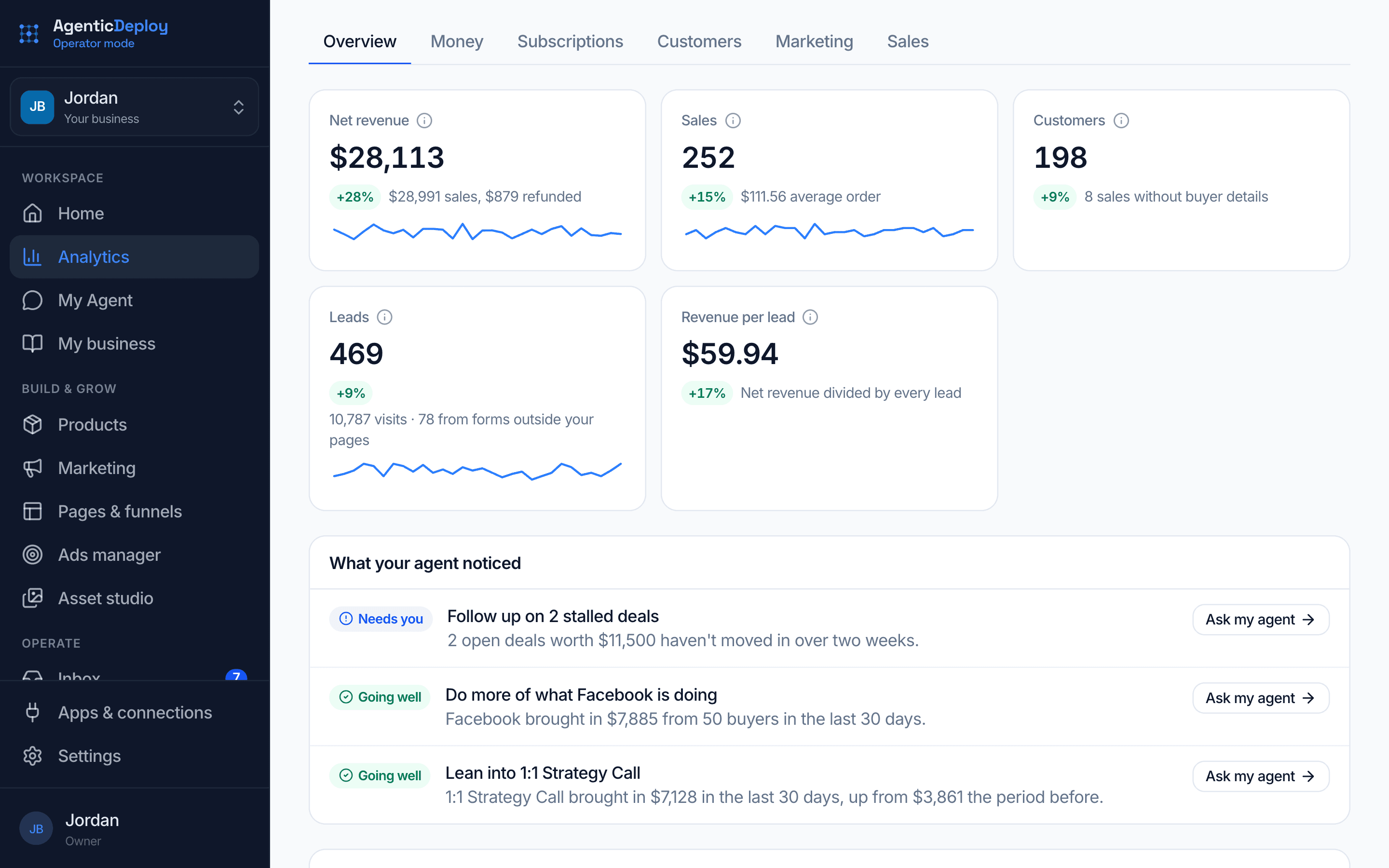
The product shows fewer sales than the period before, with gross, refunds and net side by side, so you can see exactly how big the drop is.
- 3
Beside it
Your agent flags it
Under What your agent noticed, the slowdown is called out with this period's number next to the last one.
- 4
One click
You ask why
Ask my agent puts the question in your chat, ready to send.
- 5
Then
Your agent finds the cause
It checks the product's page, where its traffic came from and how its checkout performed, then tells you what changed and what it suggests.
- 6
Your call
You pick the fix
Ask it to draft a page test, a new email or an offer change, or leave things as they are. The decision stays with you.
Your numbers, watched every day.
Your sales sync on their own and your agent flags what moved. You get the why and the fix, not another dashboard to read.
- Sales from every source synced on their own, with refunds counted on the day they happen
- Changes flagged in Analytics, with the numbers behind each one
- Every ad graded against your target
- A weekly numbers summary delivered to web chat, Slack or Telegram
- Competitor pages and offers checked on the schedule you set
- Reports built as a PDF or spreadsheet, ready to share
Start with approvals on. As trust builds, let more run on its own, one kind of action at a time.
What stays with you
You choose which actions wait for your yes. In intelligence, these are the ones to keep in your hands:
- The decisions the numbers inform
- Which sources count as the truth
- What gets shared outside the business
Where it runs
A research analyst worker that reads the apps you connect and the pages you point it to, and briefs you on the schedule you set.
Analytics counts every sales source once, with gross, refunds and net, and points out what moved for your agent to dig into.
The rest of the business.
Put AI on your numbers.
Tell us where your sales and reports live in about two minutes. If there is a fit, we will show you this running on your business on a short call.